
KB - Eclipse Search Issue
Problem Statement
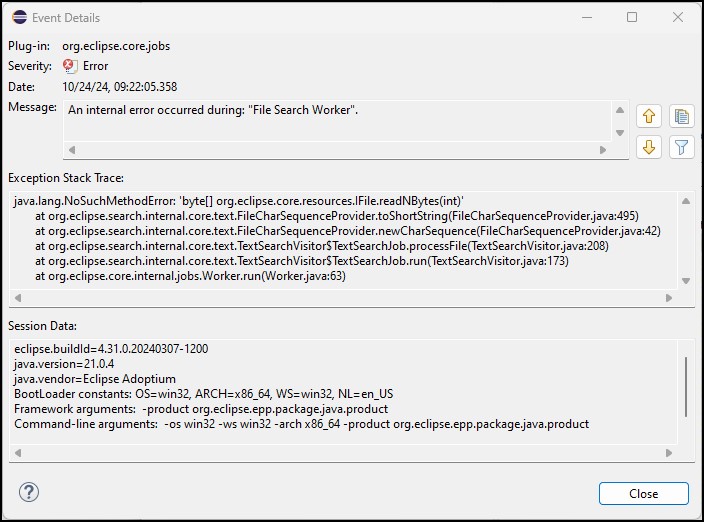
Beginning in September 2024, users may encounter an error when attempting to use Eclipse 2024-03’s built-in search facility. This error is triggered by a third-party plug-in’s search provider, which incorrectly attempts to access incompatible source code released in Eclipse 2024-09.
Scope
The following details describe the conditions under which this issue will or will not occur:
This problem can occur in Windows, MacOS, or Linux.
The version of Java, BBj, or BDT being used does not affect this issue.
It occurs in instances of Eclipse 2024-03 for Java Developers.
It can occur with Eclipse 2024-03 packages besides the Java Developers package.
It may be present with Eclipse 2024-06, although this configuration was not investigated. It is not present when using Eclipse 2024-09 (the newest version available as of October 2024).
This problem only occurs when searching for specific text using either the File Search or BDT Search options.
Steps to Reproduce
This issue occurs when executing the following steps:
Open either the Java or BDT perspective and any valid workspace. You do not need to have any editors open, although you can.
Hit the Ctrl + H key combination to launch Eclipse’s built-in search:
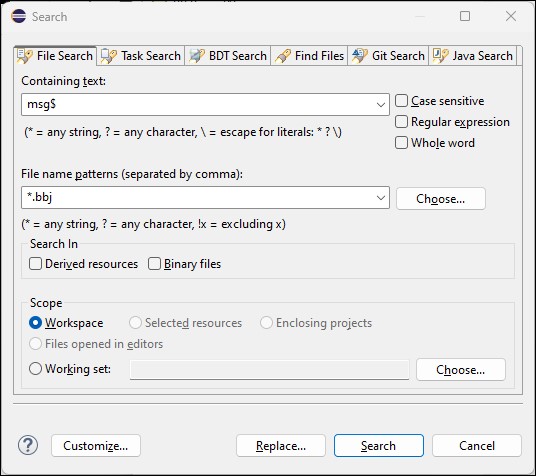
- In the resulting Search window, select either the File Search or BDT Search tabs.
Enter an arbitrary string in the Containing text: field and click the [Search] button.
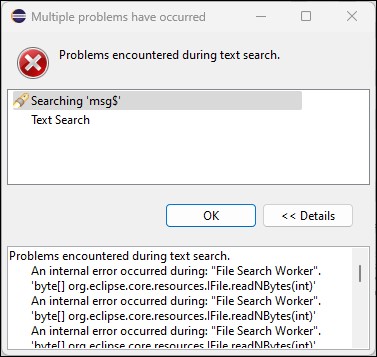
Eclipse displays a pop-up window titled Multiple problems have occurred:
Impact
The search fails and no results are displayed. Examining a corresponding entry in Eclipse’s error log shows the following Event Details:
Supporting Information
Information is available online describing this issue. For more information, see:
Resolution
The recommended solution for BDT users is to move to Eclipse 2024-09, starting with a new Eclipse installation (do not attempt to upgrade your existing Eclipse 2024-03 installation).